PMC — Give Codex lasting project context

Stop explaining the same project to Codex
PMC gives Codex a memory it can use across tasks—stored as private, portable Markdown inside your project’s Obsidian vault.
Set up lasting memory for this project in my Obsidian vault.
That single prompt starts a guided setup, creates a useful Project Home, and offers to scan the repository for the context future work will need.
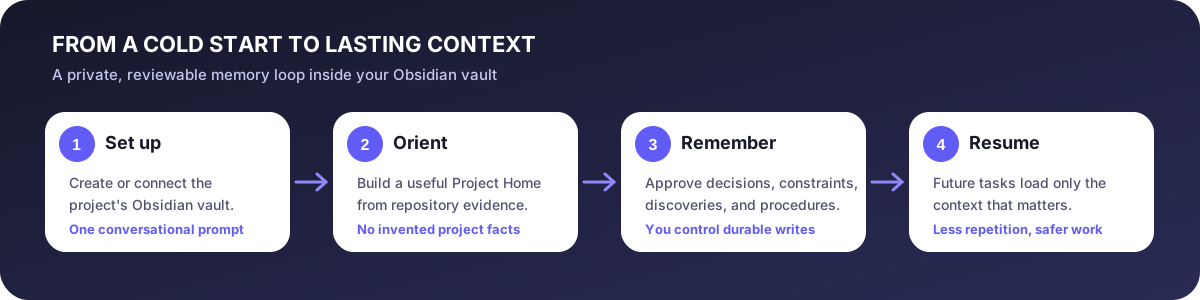
Before and after
| Before PMC | After PMC |
|---|---|
| Every new task starts cold | Codex starts from a concise current state |
| Decisions live in old conversations | Rationale and evidence remain searchable |
| Nobody knows whether notes are current | PMC checks for drift and contradictions |
| Context is locked in a tool | Knowledge stays in Markdown you control |
What PMC remembers
- Project purpose, structure, and important commands
- Accepted decisions and their rationale
- Non-negotiable constraints
- Verified discoveries and debugging lessons
- Reusable procedures
- Current status, risks, blockers, and next actions
It fits normal conversation
@PMC remember this
@PMC update the project status
@PMC what do we already know about deployment?
@PMC wrap up this task
@PMC check this project's memory
PMC can notice durable knowledge without interrupting every edit. Before promoting it, PMC tells you exactly what it wants to record and asks for approval.
Local, private, and portable
PMC has no developer server, account, telemetry, analytics, or raw transcript capture. It uses Codex’s normal local file permissions. Obsidian is the interface; ordinary Markdown is the durable format.